Enter your email address below.
7 min read...
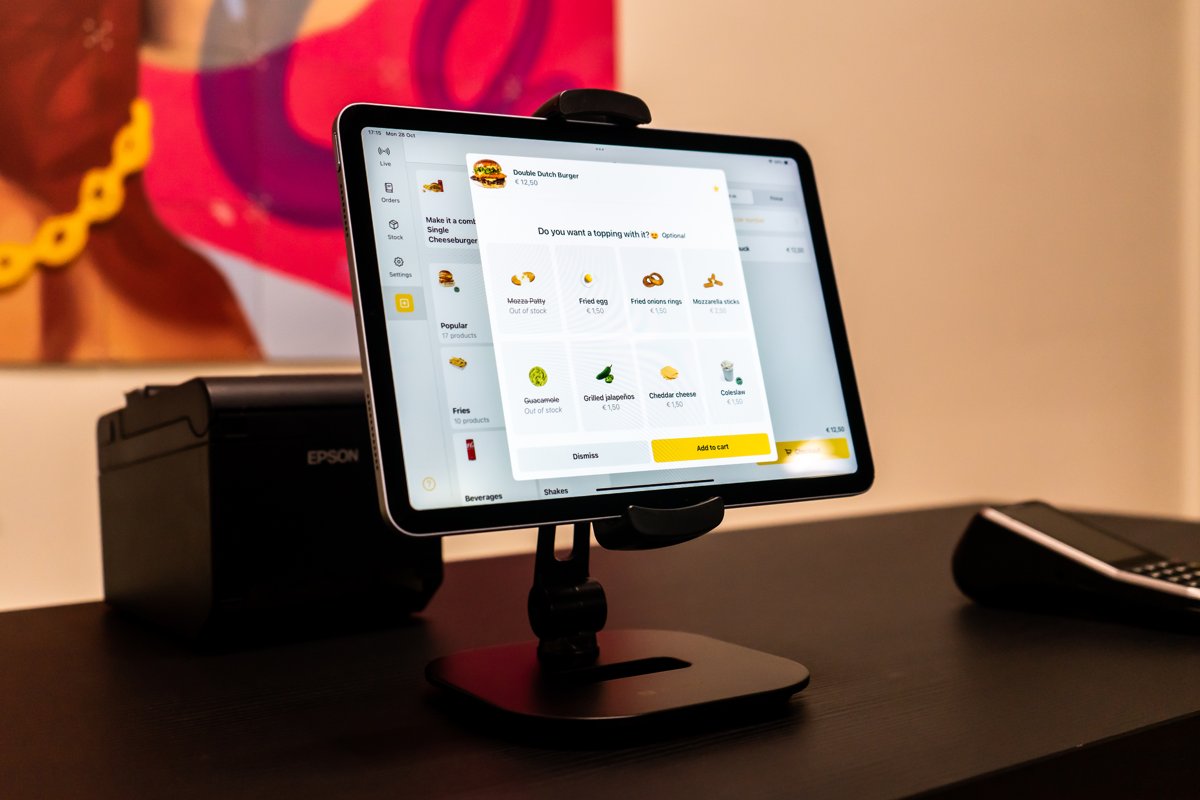
Choosing a POS system for hospitality is the kind of job you keep pushing to next week. Every supplier claims to be the fastest, the smartest or the cheapest, and the real differences hide in the things you never think to ask about during a demo. Yet this choice shapes how your business runs for years. In this article we walk through the criteria that actually matter, so you end up with a system that grows with you instead of getting in the way.
A POS hasn’t been just a payment device for a long time. It’s where your orders, your menu, your payments and your numbers come together. Get it wrong and you won’t notice on day one, but on the day you open a second location, want to add a Kiosk, or get tired of retyping delivery orders by hand.
The tricky part is that almost every system looks great in a demo. An empty menu on a clean screen always works. The real question is how it holds up on a busy Saturday night, with a new hire behind the counter and a menu you changed last week.
Run through these seven points before you sign anything. They’ll cost you an afternoon, and save you from moving your entire setup later.
Don’t start with the system, start with your business. Do your guests order at the counter, at the table, on a screen, or all three at once? A busy takeaway with a queue out the door needs something different from a table-service restaurant.
Write down how one order travels through your business from start to finish. That list is your yardstick for every supplier.
This is the point most people skip, and the one they regret. You might start with just a POS today, but in a year you may want a Kiosk by the door or QR ordering on the terrace.
If those live in the same system, everything lands on one screen and shows up in one overview. If they don’t, you’re maintaining two menus and laying reports side by side at the end of the month to work out what happened.
Prices change, dishes come and go, and a seasonal special is only on the menu for a few weeks. The question isn’t whether you’ll update your menu, but how much thought it takes every time.
Look for this:
With Onesix you manage all of this from the Dashboard, and we set up your menu at the start based on your existing one. After that you adjust it yourself, or leave it to us.
Look further than “we accept card payments”. Which payment methods do you want to offer, and can you decide yourself which cards you activate? Just as important: what happens when the internet in your place gets flaky?
With the Onesix POS you can take payments through Tap to Pay in the app, so without a separate card terminal. That saves hardware and makes you less dependent on one device in one spot.
If you work with delivery platforms, you know the drill: a separate tablet per platform, and someone retyping orders into the POS. It costs time, and on a busy night it will go wrong.
So ask outright whether delivery orders come in directly. The Onesix POS connects with Thuisbezorgd and Uber Eats, so those orders land on the same screen as the rest and go straight to the kitchen.
You might spend a week digging into this system. Your summer hire has five minutes. During a demo, don’t let the owner do all the clicking, hand it to someone who’ll actually use it.
Pay attention to the order flow on screen, too. A well-built menu makes sure the question “anything with that?” never gets skipped. That’s exactly why the upsell logic from the Kiosk also sits in the Onesix POS: not to steer your team, but to stop revenue slipping away when it’s busy.
Ask about the cost over three years, not the first month. Think about the licence, the hardware, and what it costs to add a location or an extra order point. And the big one: what happens if it turns out not to suit you?
With Onesix there are no one-off software or setup costs and the licence is cancellable monthly. You’ll always find the current amounts on the POS page.
Take these into every conversation. The answer usually tells you more than the brochure.
| Question for the supplier | Why it matters |
|---|---|
| Can I add a Kiosk or QR ordering later? | Otherwise you’re rebuilding everything in a year |
| Do I update my menu myself, and does it apply everywhere? | Saves weekly hassle and mistakes on the menu |
| Do delivery orders come in automatically? | No extra tablets, no retyping |
| Do I see every order in one overview? | Otherwise your numbers never quite add up |
| What am I tied into, and how do I get out? | A short notice period keeps you free |
| Can I try it in my own business first? | A demo says little about a busy Saturday |
The Onesix POS runs on the included tablet, neatly connected to your receipt printer, or simply from your phone through the app. Orders from the counter, the Kiosk and the Online Kiosk all land in one place, and you manage everything from the same Dashboard.
Want to bring the kitchen in? You can, with the Kitchen Display as a separate add-on. Rather stick with printed tickets? That works too, and the two run happily side by side.
More than 1000 hospitality operators work with Onesix this way, from Subway to Bakker Bart, with a 4.7 on Trustpilot. Curious what you can do with all that data afterwards? Read which numbers from your POS actually help you grow as well.
What should I look at first when choosing a POS system? Start with how your guests order and work backwards from there. A system that fits your order flow matters more than a long feature list you’ll never use.
Can I add a Kiosk or QR ordering later? With Onesix, yes. POS, Kiosk and Online Kiosk all run from the same Dashboard, so you add what you need without starting over.
Do I have to enter my menu myself? No. We set up your menu based on your existing one. After that you adjust products, prices and options yourself in the Dashboard, or have us make the changes.
Can I try it out first? Yes. You test it free for 30 days with no strings attached, in your own business, with your own menu and your own guests. That tells you more than any demo.
The best way to know whether a POS system suits your business is to simply run it for a month and see how it holds up on a busy day. You test the POS free for 30 days with no strings attached, the licence is cancellable monthly and you can always count on 24/7 support.
Want to talk through which setup fits your business first? Get in touch and we’ll take a look together.
Wouter works as a Marketing Specialist at Onesix. This news site offers relevant articles for people working in or interested in hospitality, retail, and amusement parks.