Enter your email address below.
7 min read...
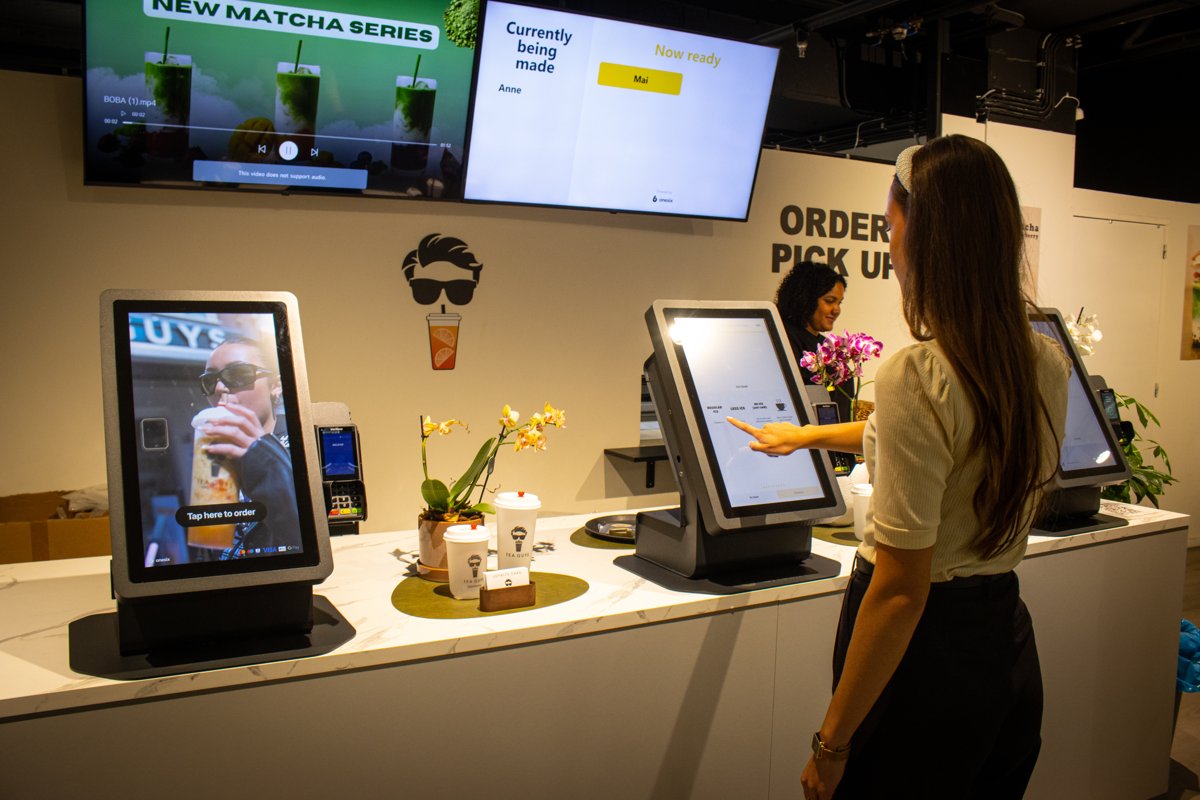
It’s Friday night, the place is packed and someone behind the counter shouts “Number 42!” for the third time. Nobody moves. Meanwhile, two guests ask whether their order is nearly ready. Sound familiar? An order status screen solves exactly that: your guests see for themselves when their order is ready, without asking and without shouting. In this article you’ll learn how a pickup screen works, when it pays off and how it works together with your Kiosk and POS.
An order status screen is a display in your venue that shows the status of orders live. Usually in two columns: what’s still being made and what’s ready for pickup. Your guest glances up, sees their order move to “ready” and walks to the counter.
At Onesix, this is called the Status Screen. It shows order status in real time on your own TV. Good to know: the Status Screen only shows order status, not your menu. So it isn’t a menu board, but a calm overview of what’s happening in the kitchen.
Calling out numbers seems simple, but during a rush it costs more than you’d think:
An order status screen takes over that job. Your team marks an order as ready and the rest happens automatically.
With a screen that’s directly connected to your orders. That’s how the Onesix Status Screen works: from order to pickup, everything runs through one system.
Rather not have a screen in view, or want guests to be able to wait outside? You can also have guests automatically receive a text message as soon as their order is ready. Screen, text or both: you choose what suits your venue.
You don’t need a special display. If your TV has an HDMI port, you can get started right away. We send the device to your venue, you connect it and activate it yourself. Prefer on-site help? Then we’ll schedule a moment together.
In the Dashboard you can see how quickly orders are processed and picked up. That shows you where things get stuck during the rush, so you can adjust how you work.
There are several ways to let guests know their order is ready. A quick overview:
| Calling out | Pager | Order status screen | |
|---|---|---|---|
| Work for your team | Calling every order | Handing out and collecting pagers | Marking orders ready on the tablet |
| Overview for guests | Only at the moment you call | Only when it goes off | Always visible what’s being made and what’s ready |
| During a rush | Hard to hear | Works, but managing it takes time | Stays clear |
| Connected to your orders | No | Depends on the system | Directly connected to Kiosk, POS and Online Kiosk |
A pager can work well, for example when guests are spread across a large terrace. But in a venue where guests wait at the counter or within sight of the screen, an order status screen brings the most calm.
A pickup screen pays off especially if you do a lot of takeaway or if guests collect their own orders. Think of:
Dealing with long queues at peak times? Also read how to shorten queues in hospitality with technology.
The Status Screen is for your guests. The Kitchen Display is for your team in the kitchen. They’re two separate add-ons you can use independently. So you don’t need a Kitchen Display to use a Status Screen: if your kitchen works with printed tickets, that’s still perfectly possible. Not sure what’s best for your kitchen? In Kitchen display or ticket printer we compare both options.
With an order status screen that’s connected to your orders. The Status Screen shows live on your own TV which orders are being made and which are ready. Rather not use a screen? Then guests can automatically receive a text message as soon as their order is ready.
Yes. If your TV has an HDMI port, you connect the Onesix device and activate it yourself. On-site help is also available.
No. The Status Screen only shows real-time order status: what’s being made and what’s ready for pickup.
The Status Screen is connected to your Onesix orders. Those can also come from the POS or the Online Kiosk, so a Kiosk isn’t required.
Check the current prices on the Status Screen page. You can test it first without obligation, and after that the license can be cancelled monthly.
An order status screen is a small change with a big effect on the atmosphere in your venue. Your guests know where they stand, your team no longer has to shout or answer the same question over and over, and the counter stays free for new orders. Together with your Kiosk, POS or Online Kiosk, everything runs through one system, with 24/7 support whenever you need us.
Curious what the Status Screen would look like in your venue? Test it free for 30 days with no obligation, or book a call and we’ll work out the right setup for you together.

Wouter works as a Marketing Specialist at Onesix. This news site offers relevant articles for people working in or interested in hospitality, retail, and amusement parks.