Enter your email address below.
7 min read...
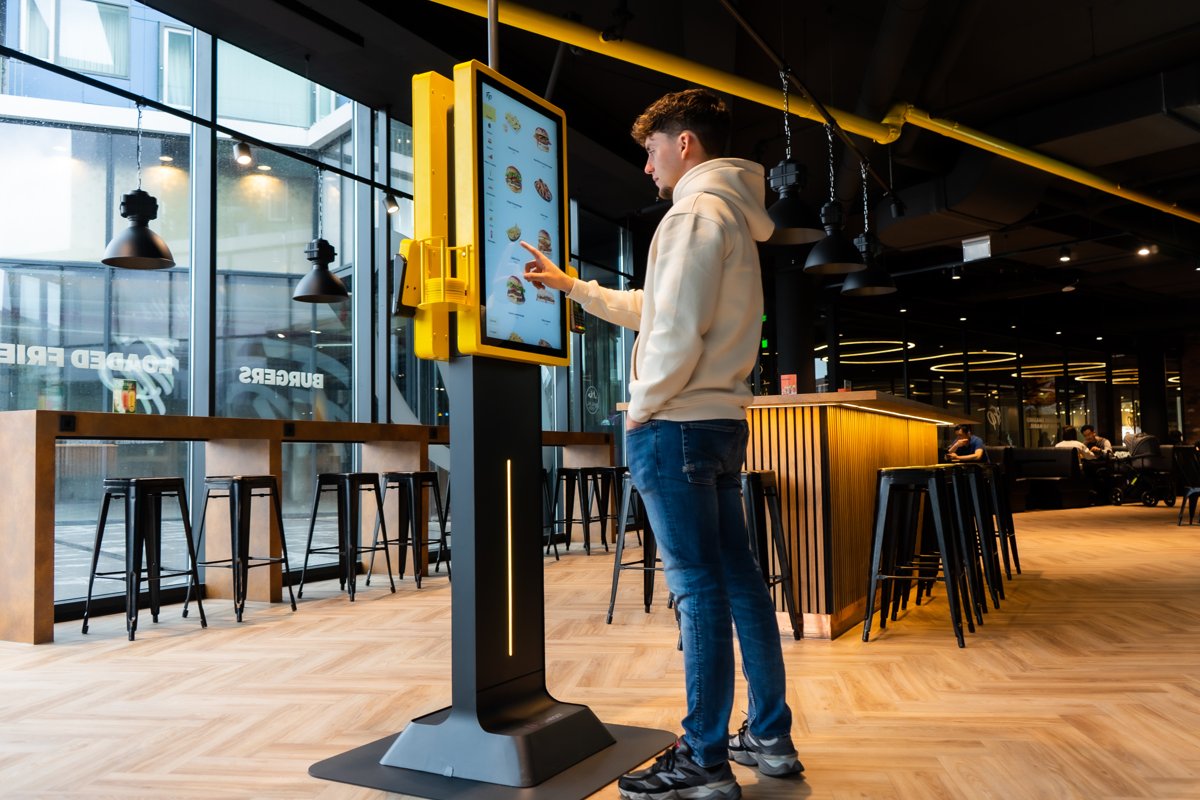
Walk into a McDonald’s and the first thing you see is the row of big touchscreens. Guests tap their meal together, pay, and wait for their number. No queue at the counter, no rush. No wonder more and more operators are asking: can I put a self-order kiosk like McDonald’s in my own place? Short answer: yes. And you don’t need an IT department or a chain-sized budget to do it. In this article you’ll see what you can borrow from the big chains, and how to set it up as an independent business.
Big fast-food chains have worked with self-service kiosks for years. Not because they look modern, but because they tackle a few stubborn problems in one go:
These aren’t chain-only problems. A snack bar on Friday night, a lunch spot at half past twelve, a burger joint after a football match: anyone with peaks in the day knows the feeling.
At a chain, there’s a whole team behind the kiosks. Building software, sourcing hardware, managing menus, rolling out updates. You don’t have to handle any of that yourself. What you do need:
With Onesix, all of that lives in one system. No stitching separate suppliers together.
The first thing you notice at the chains is the size. A big screen grabs attention and makes it instantly clear: this is where you order. The Kiosk Premium has a 32-inch touchscreen and is built to stand out. Want two screens on one unit? Then the Kiosk Premium X is an option. Short on space? The Kiosk Pro with its 20-inch screen fits, or you mount the Kiosk Pro Wall on the wall.
Make it a meal? Go large? The chains offer that on screen as standard, and it works. You can do the same on the Kiosk. You decide which extras and combos show up, and when. The result: at the Kiosk, the average order value is proven to be 20% higher.
A chain has a recognisable brand, and so does your business. You can have the Kiosk wrapped in your own colour, put your logo on it and even play your own brand video on it. That way it doesn’t feel like someone else’s screen, but like part of your place.
At the chains, your number pops up on a big screen as soon as your food is ready. You can do that too, with the Status Screen on your own TV. Prefer pagers? You can fit the Kiosk with an integrated pager holder.
Lots of tourists or expats coming in? The Kiosk can show your menu in multiple languages once you set that up for your location. Read more in our post on the multilingual self-order kiosk for tourist spots.
A chain rolls out one concept across hundreds of locations. You run one place or a handful, and that’s actually an advantage. You change your menu whenever you like, test a new item on Friday and pull it on Monday. In the Dashboard you edit products, prices and options yourself. No time for that? Onesix can make the change for you.
Getting started is different too. There’s no months-long project. Onesix sets up your menu based on your existing menu card. You can install the Kiosk yourself, and if you’d rather have it done for you, professional installation is available (this may come at an extra cost).
Still not sure whether a Kiosk beats ordering at the counter? Have a look at ordering kiosk or table service: what works better in fast-food restaurants.
| Big chain | Your business with an Onesix Kiosk | |
|---|---|---|
| Software | Often built in-house | Ready to use, maintained by Onesix |
| Updating the menu | Centrally, for every location | Yourself in the Dashboard, or via Onesix |
| Look and feel | Own brand identity | Your own colour, logo and video on the Kiosk |
| Getting started | Big roll-out project | Menu set up from your existing menu card |
| Trying it out | Own project, own budget | 30 days free and no strings attached, in your own place |
You don’t need a chain budget. You pay for the hardware in one go or in instalments, and the licence can be cancelled monthly. For current prices per model, check the Kiosk page. Want to know everything to factor in? Our pricing guide for self-order kiosks walks you through it.
Isn’t a self-order kiosk just for big chains? No. More than 1,000 hospitality businesses work with Onesix, from snack bars and lunch spots to burger joints. Places with busy peaks tend to notice the difference fast.
Can guests pay at the Kiosk too? Yes. Guests order and pay on their own at the Kiosk, so the order goes straight through.
Do I have to enter my menu myself? No need. Onesix sets up your menu based on your existing menu card. After that you tweak it yourself in the Dashboard, or have Onesix make the changes.
What if it’s not for me? You test the Kiosk for 30 days, free and with no strings attached. Not happy? We’ll come and pick the Kiosk up again.
A self-order kiosk like the big chains have, but tailored to your business. Test the Kiosk for 30 days, free and with no strings attached. The licence can be cancelled monthly and you can always count on 24/7 support.
Want to talk through which model suits your place first? Get in touch and we’ll figure out the best setup together.
Wouter works as a Marketing Specialist at Onesix. This news site offers relevant articles for people working in or interested in hospitality, retail, and amusement parks.