Enter your email address below.
6 min read...
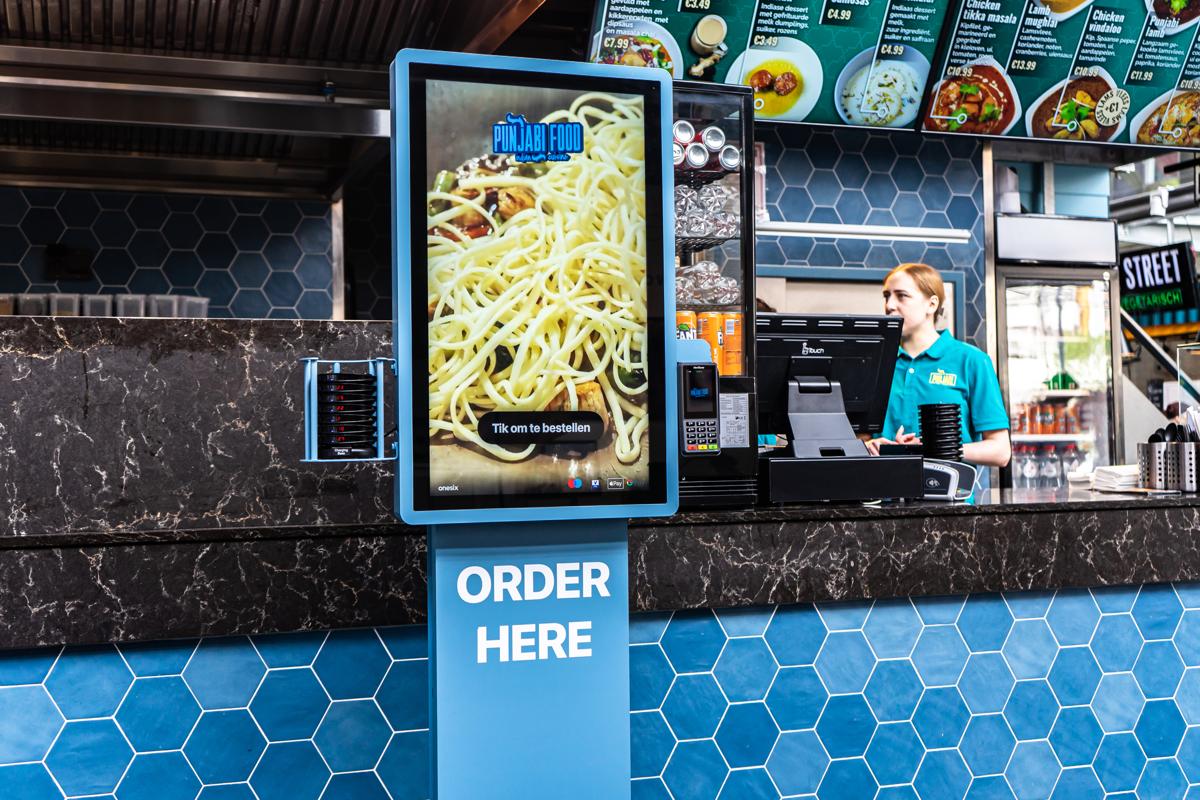
Self-checkout, self-service till, self-order kiosk, ordering kiosk, Kiosk. If you’re looking into a self-checkout for your restaurant, you’ll quickly run into five words for what looks like the same thing. It isn’t. The self-checkout at the supermarket works very differently from a self-order kiosk in a snack bar or lunchroom. In this article, we line up the terms, show you where the difference lies and help you answer the real question: what fits my business?
A self-checkout is a till where guests pay on their own, without a staff member in between. The best-known example is the self-scan checkout at the supermarket. You grab your groceries, scan the barcodes, pay and walk out.
That works great in a supermarket, because the product is already on the shelf. Nothing needs to be prepared. The till only needs to know what you’re taking and what it costs.
A self-order kiosk (also called an ordering kiosk or self-service kiosk) is built for businesses where the product still has to be made. Guests don’t scan anything. They put their order together on a touchscreen:
At Onesix, that self-order kiosk is called the Kiosk. It comes in different shapes: freestanding, wall-mounted or compact on the counter.
Looking for a self-checkout for your restaurant? In practice, you’re almost always looking for a self-order kiosk. A guest at a fries shop or kebab place doesn’t just want to pay. They want to order. They want to pick from your menu, add extras and know when their food is ready.
A self-scan checkout isn’t made for that. There’s no barcode to scan in a kitchen. What you do need: a clear menu, smart suggestions and an order that lands neatly in the kitchen.
| Self-scan checkout (supermarket) | Self-order kiosk (hospitality) | |
|---|---|---|
| What does the guest do? | Scan products and pay | Pick from the menu, add options and pay |
| Product | Ready on the shelf | Prepared after the order |
| Kitchen | Not needed | Receives the order straight away |
| Upsell | Hardly any | Extras and combos at the right moment |
| Pick-up | Guest leaves right away | Order number, pager or order status screen |
| Fits | Supermarket and retail | Snack bar, fast food, lunchroom, café, food court |
Several guests order at the same time instead of one by one at the till. Especially at busy moments, that makes a real difference. Also read how self-order kiosks compare to counter service in fast food restaurants.
A self-scan checkout won’t ask if you’d like a drink with that. A self-order kiosk will. On the Kiosk, you decide which extras and combos show up. Operators with a Kiosk see an average of +20% revenue.
Your team doesn’t have to take every order and can focus on preparing, serving and hospitality. The kiosk doesn’t replace your staff, it takes work off their hands.
Guests choose for themselves, so less gets lost along the way. The order comes in digitally and clearly, including the chosen options and extras.
A self-order kiosk doesn’t mean your staffed till disappears. Plenty of businesses use both: guests who want to order quickly head to the Kiosk, guests who’d rather talk to someone order at the counter. The photo at the top shows exactly that: the Kiosk stands right next to the counter.
With the Onesix POS and the Kiosk, you work in one system. You manage your menu, prices and options in one place in the Dashboard. Still not sure which POS system fits your business? Read which POS system fits your restaurant.
Do your guests prefer to stay at their table? Then the Online Kiosk is an option: guests scan a QR code and order and pay on their own phone, no app needed.
Want to know which model fits your space? You’ll find all models on the Kiosk page. For what a self-order kiosk costs, check out our price guide.
Is a self-checkout the same as a self-order kiosk? Not quite. A self-checkout is mainly for paying on your own, like the self-scan checkout at the supermarket. A self-order kiosk also lets guests build their order and sends it to the kitchen. In hospitality, that’s almost always what you need.
Can guests pay at the Kiosk too? Yes. Guests order and pay on their own at the Kiosk, so the order goes through right away.
Do I have to enter my menu myself? No need. Onesix sets up your menu based on your existing menu card. After that, you adjust products, prices and options yourself in the Dashboard, or let Onesix make the changes for you.
Can I keep my staffed till? Absolutely. The Kiosk works perfectly next to a staffed till. Lots of operators use both.
What if it’s not for me? You test the Kiosk free and without obligation for 30 days. Not happy? We’ll come and pick it up.
More than 1000 hospitality businesses went before you. Test the Kiosk free and without obligation for 30 days in your own business. After that, you pay for the hardware in one go or in instalments, the licence can be cancelled monthly and you can always count on 24/7 support.
Rather talk through the right setup for your business first? Get in touch and we’ll figure out together what fits.

Wouter works as a Marketing Specialist at Onesix. This news site offers relevant articles for people working in or interested in hospitality, retail, and amusement parks.